Hosts & deployment
Flowdrome splits management from execution:
- The Nucleus is the control plane. Workflow registry, credentials vault, users & roles, the host fleet, deployments, the approvals inbox. It never executes a workflow.
- A host is the data plane: the host agent running as its own process — usually on a machine of its own — with the same engine the editor uses embedded inside it. Deployed workflows are served by that engine. Hosts keep running if the Nucleus is unreachable; they dial home for secrets at run start and for management actions.
The split is the architecture’s load-bearing wall. The control plane can restart, upgrade, or sit on the other side of a flaky link without taking a single workflow down — and a host can be a 300 MB live-ISO VM that does nothing but run apps. The screen-by-screen tour of both sides (fleet view, host dashboard, approvals inbox, run drawer) is the Hosts guide.
The built-in host
A Nucleus with no host attached could manage workflows but never run one, so every install started with a second machine before it could do anything. It no longer does: the Nucleus supervises a host of its own, started with it and enrolled over loopback, listed in Hosts as Built-in host. One container, one CT or one executable is a complete Flowdrome.
This does not soften the split above — it is a separate process (the same flowdrome-host
executable, dropped beside the Nucleus) with its own data directory, its own engine and its own port
(4820, the Nucleus’s port plus 20), enrolled through the same path as any other host on a join
token the Nucleus mints for it. The Nucleus still never executes a workflow; it just no longer
requires you to supply the machine that does. Turn it off with FLOWDROME_BUILTIN_HOST=0 when you
want execution only on machines you chose.
It binds whatever interface the Nucleus binds — exactly as exposed as its parent, never more — but
what it advertises is loopback, because the Nucleus calls it from the same box. The dashboard
knows that means “the machine the Nucleus is on” and shows you the address you are browsing on
instead, with the host’s port kept. The variables that change any of this
(FLOWDROME_BUILTIN_HOST_PORT, _BIND, _ADVERTISE) are in Install.
Enrolling a host
Enrol a host when you want workflows executing somewhere other than the Nucleus’s own machine. Enrolling is never a prerequisite for deploying: the built-in host above is already a target.
Install a host (a Docker image or a Proxmox LXC template from the releases page,
the live ISO appliance, or the bare single-file agent), then connect it: Hosts → Join token in
the Nucleus mints one; the agent takes it via CLI (--join), environment (FLOWDROME_JOIN_*) or its
GUI Connect to Nucleus screen. Authorized hosts appear in the fleet view, grouped by
environment, with live status, an open-host link, and per-host deployments. De-authorizing a host
stops it from receiving anything.
Deploying a workflow
From a workflow’s Deploy action, pick a host — that’s the whole decision. The Nucleus pushes
the exact flowdrome.workflow.v1 document you tested (no conversion, no compile step), stamped
with its saved version and deploy time, plus a scoped resolve token for
secrets leasing. The host persists the deploy envelope (it
survives restarts) and registers the workflow with its embedded engine — the unified hosted
runtime: one engine and one worker pool per host, shared by every workflow deployed to it.
The host’s serve layer takes over the triggers: HTTP webhooks, schedules (interval and cron), HTML forms, web chat, WebSocket, Telegram (long-poll and webhook), Slack events, WhatsApp, and the Table trigger’s change-feed poller. Runs execute on the embedded engine with the same envelope capture you saw in the editor. Stopping a deployment is intentional and distinct from a crashed one; removing it uninstalls the document.
x64 note: the host’s engine worker is compiled with Bun’s standard build, which requires AVX2. On Proxmox set the VM CPU type to
host— akvm64-class vCPU kills it at launch (exit 132).
Sub-workflows come along
A workflow that runs sub-workflows installs self-contained. On deploy the Nucleus walks the whole dependency tree and:
- Checks everything exists first — every sub-workflow it uses (transitively), plus the variables and credentials it and its subs reference. Anything missing blocks the deploy with the exact list, so a workflow never installs only to fail on its first run.
- Inlines the sub-workflows into the deployed document. Each Execute Workflow node is expanded into the master graph, so the host serves one workflow: every node runs — and is tracked — in a single run history, and the sub-workflows never appear as separate deployments cluttering the fleet.
The Deploy action previews what an install brings along (“…brings along 3 sub-workflows, embedded to run inline”). Secrets are still never baked in — the host dial-homes for their values at run start; the dependency check only confirms they’re defined.
The same self-contained artifact comes from Export → Self-contained (or
GET /api/workflows/{id}/export?bundle=1) — a single file that installs anywhere with nothing else to bring.
Deploy carries a frozen copy
Sub-workflows aren’t the only dependencies that ride along. A deploy walks the workflow for the tables it reads or writes and the interfaces whose pages run it, and freezes a copy of each:
- Tables deploy with their schema pinned at the deploy-time version. The host serves rows against that frozen schema, so a column dropped or retyped in the Nucleus tomorrow can’t break a running app.
- Interface pages that call the workflow deploy with the workflow, at their current content version, and are served from the host.
The deploy manifest lists all of it up front — the same “checks everything exists first” gate that covers sub-workflows now includes tables and interfaces, each with the exact version being pinned:
GET /api/workflows/{id}/dependencies
  → { ok, subWorkflows[], variables[], credentials[],
      tables:[{id,name,version,present}], interfaces:[{id,title,slug,version}] }
Editing the live table or interface afterwards mints a new version (its
version history records it), but active deployments keep
serving their pinned copy — they don’t drift out from under you. The change reaches a host only
when you redeploy. Until then the table/interface’s Where used
view flags each lagging deployment stale, so the impact of a schema or content edit is visible
before you commit it — the same version-badge drift you see for the workflow document itself.
Or skip the host: package a unit
Deploying puts a workflow onto a machine you already run. The other shape turns it around — the workflow becomes the machine.
Package as unit (Workflows screen) emits one finished artifact: a docker load-able image or a
Proxmox CT template, carrying the host runtime, the dashboard and every workflow the selection needs.
Copy it over, install it, done — there is no build step, and nothing else has to be present.
| Deploy to a host | Package as a unit | |
|---|---|---|
| The machine | one you already run | the artifact is the machine |
| Arrives as | a push from the Nucleus | a file you copy |
| Credentials | leased from the Nucleus | leased, or sealed inside |
| Runs air-gapped | no | yes, when sealed |
| Updating it | re-deploy | rebuild and reinstall |
A unit is still a host underneath — same engine, same console, same start/stop/pause — so everything below about serving, pausing and run history applies to it unchanged. The Package as a unit guide covers the sealed/connected choice, access modes and what a unit can tell you about itself.
What a host exposes on its port
A host — enrolled, packaged as a unit, or built into the Nucleus — serves its dashboard, its API and
every deployed workflow’s triggers from one port: 4801 for a standalone host, 4820 for the
Nucleus’s built-in one. The Docker image, the Proxmox LXC template and the live
ISO all bind 0.0.0.0, so the box answers on every interface it has; the bare executable defaults
to 127.0.0.1 and widens only when FLOWDROME_HOST_HOST says so (the built-in host follows the
Nucleus’s binding instead, or FLOWDROME_BUILTIN_HOST_BIND). Put a host on a network you trust,
or behind a proxy that fronts it.
Token mode is the default, and a packaged unit always pins a token. It gates mutations and run content — not the whole box. Without any credential, a caller who can reach the port reads:
| Endpoint | What it returns |
|---|---|
GET /healthz | liveness |
GET /, /assets/* | the dashboard shell |
GET /api/config | host or unit name, environment, whether open mode is on, whether this is a sealed unit |
GET /api/bootstrap | host id, boot time, the data-root and apps paths, the agent’s kind and version |
GET /api/enrollment | whether it is enrolled — and if it is, its Nucleus URL and instance id |
GET /api/apps | every deployed workflow’s name, version, status and routes (method and path), its run and failure counts, when it last ran, its schedule, and any pending approval gates with their title and description |
GET /api/engine/workflows | the same workflows in the serve layer’s own shape — name, version, when they were deployed, and every route, form, chat, WebSocket and bot path |
GET /api/apps/{id}/metrics | run counts, average and max latency, success rate, the history series, the slowest steps by name |
GET /api/resources | the box itself — OS and architecture, uptime, CPU count and load, total/free memory and disk, and the data path |
GET /api/metrics/export | the host id and environment, plus the recorded metric samples the Nucleus scrapes |
GET /api/settings | the engine knobs, the resolved data/workflow/log paths, the telemetry URL |
GET /api/serve/runs/{id} | one run’s outcome — see below |
| the deployed routes themselves | whatever the workflow answers |
Metrics answers an anonymous caller with the charts and not the runs: the runId, each run’s
error text and the latest run’s console logs are stripped out. Sending the token (or signing in
with your Nucleus credentials, on an enrolled host) restores them.
Everything else needs the host access token as Authorization: Bearer <token> — or, on an enrolled
host, a signed-in Nucleus user’s token, which the host forward-validates against its Nucleus:
GET /api/engine/runs/{id}— the node-by-node run detail: every node’s input and output.GET /api/engine/workflows/{id}/definition— what the box actually runs.GET /api/credentials-in-use— the credential names this box needs.GET /api/apps/{id}/approvals, and approve/reject — deciding a parked run is a mutation of its outcome.- Every mutation: deploy, remove, start/stop/pause/resume, settings, disconnect, run-a-document.
GET /api/serve/runs/{id} is open on purpose. It is how a webhook caller collects the result of the
run it started, so the unguessable run id is the capability that scopes it — and what comes back
is the caller view (status, output, error), never the execution trace. Treat a run id like a bearer
token for that one run’s outcome.
One mutation is open in one window: while a host is not yet enrolled and no token is pinned,
POST /api/enroll accepts anyone — the first-boot setup path, where the join token is the real
boundary. A packaged unit pins its token at build time and never has that window; a bare agent has it
from first boot until it enrolls.
The built-in queue broker (POST /mq/*) goes the other way: with no FLOWDROME_MQ_TOKEN set it
refuses every caller that is not on loopback.
An enrolled host is also a proxy hop to its Nucleus for a couple of read paths (/api/nucleus-apps…,
which is how its dashboard folds in the Nucleus’s own apps). It forwards whatever bearer the caller
sent, so the Nucleus’s own auth decides the answer — and by default that means an anonymous visitor
reads as the Nucleus’s built-in view-only principal. FLOWDROME_REQUIRE_AUTH=1 on the Nucleus closes
it. A standalone host or unit has no Nucleus and answers an empty list.
Watching the fleet
- Workflows view — each workflow row expands to its deployments across hosts (matched by
workflow id, so renames don’t orphan deployments), with status, a version badge (
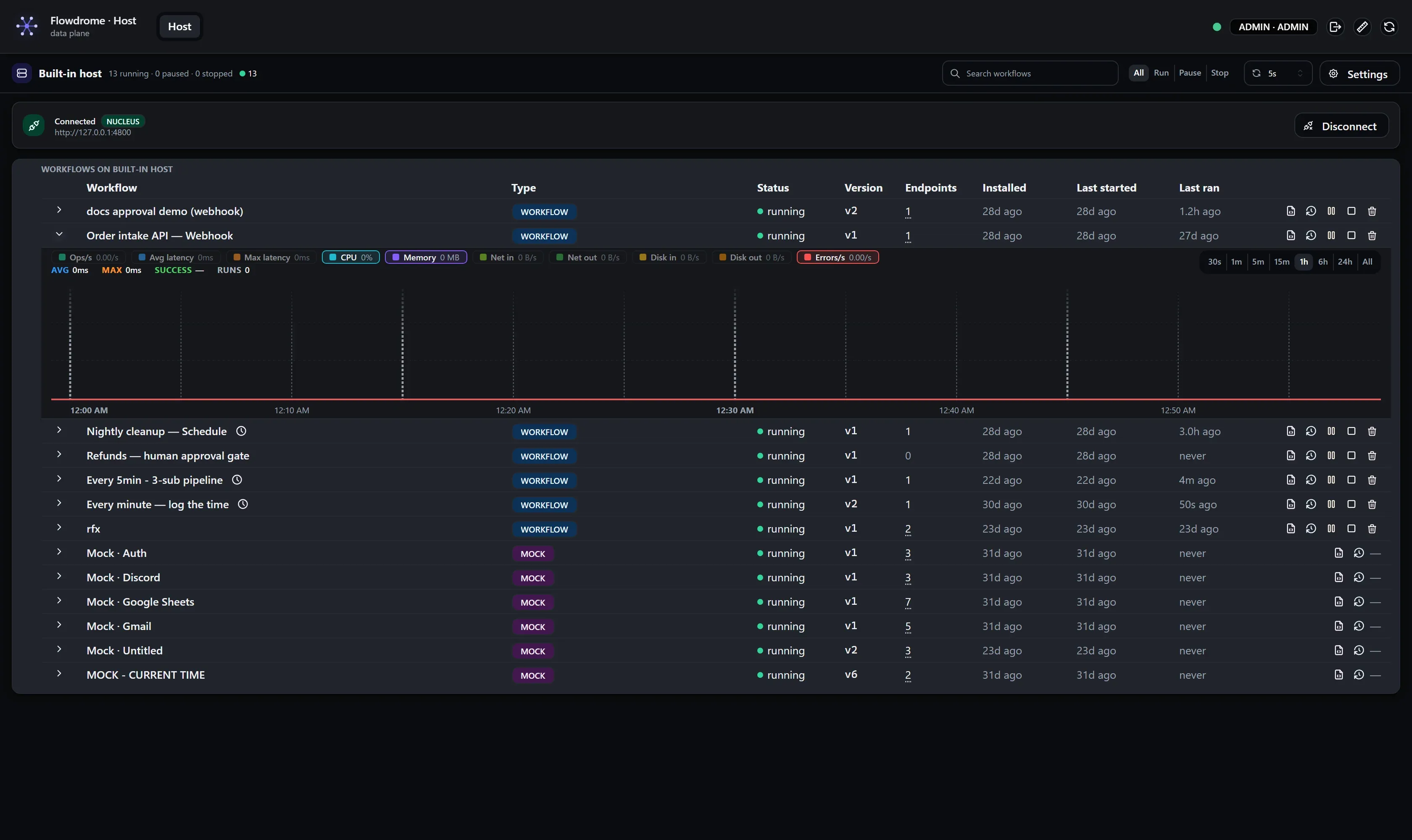
v3in teal when the deployment matches the current saved version, orange when it has drifted behind a newer save), and a logs drawer streaming output through the Nucleus. - Hosts view — fleet health at a glance; each host’s own dashboard shows its workflows, queues and the run ledger, with per-workflow CPU, memory and network telemetry on an expandable strip in each row rather than a separate tab.
- Approvals inbox — every pending approval gate across every authorized host, in the Nucleus header, with approve/reject in place.
The host upgrade story
Host state lives in one data directory; the agent is replaceable around it. The built-in host is
upgraded by upgrading the Nucleus — it is a binary inside the same image or CT, and its data lives
under the Nucleus’s own data directory (builtin-host/), so it rides the same volume.
-
Bare exe / Docker: replace the binary or image, keep the data directory / volume.
-
Proxmox LXC: run
flowdrome-upgrade <new-template.tar.gz | url>inside the container. The template doubles as the upgrade artifact, and the helper is baked into every CT — host and Nucleus alike — at/usr/local/bin/flowdrome-upgrade. From the Proxmox node itself that ispct push <vmid> <file> /root/u.tar.gz && pct exec <vmid> -- flowdrome-upgrade /root/u.tar.gz.It replaces
/apprather than extracting over it: merging leaves every hashed UI asset from every past build on disk, andindex.htmlis the one file with no hash in its name — a cached tab goes on loading the previous release’s bundle, silently, with no error anywhere. Swapping the directory makes a stale cache 404 and reload. The old/appis kept at/app.previousuntilsystemctlconfirms the new service came up active, and the upgrader installs the new version of itself last, only once that has happened./datais never touched.Or, with
/dataon its own mount point, create a new CT from the new template andpct move-volumethe data volume across. -
Live ISO appliance: the OS is the ISO — upgrading is swapping the attached ISO and rebooting. At boot the appliance adopts its data disk by label:
- A filesystem labelled
FLOWDROME_DATA→ mounted as the data directory. Never reformatted. - Otherwise, the first provably blank disk (no filesystem signatures, no partition table;
removable/optical/read-only devices excluded) → formatted exactly once, labelled
FLOWDROME_DATA. - No candidate disk → the host runs ephemeral and says so on the console.
Host identity, apps and run data ride the data disk across ISO swaps. OS-level changes (including passwords) live on the boot overlay and reset every reboot — that is the appliance contract.
- A filesystem labelled
Scale expectations
The management plane is light: a host comfortably manages 100 deployed workflows on its shared runtime (monitoring round-trips under 50 ms, restarts in the hundreds of milliseconds). Deploys are pushes of a JSON document — provisioning many hosts is bound by your network, not by a build step.