Tables
Automations need state between runs: a lead queue, a dedupe registry, an enrichment cache, an approval ledger. Tables is that state — a small, durable database built into the Nucleus (the same embedded store that already keeps your workflows and credentials), with a grid UI, a REST API, a workflow node, and a record-change trigger. No Postgres to run, no spreadsheet to abuse.
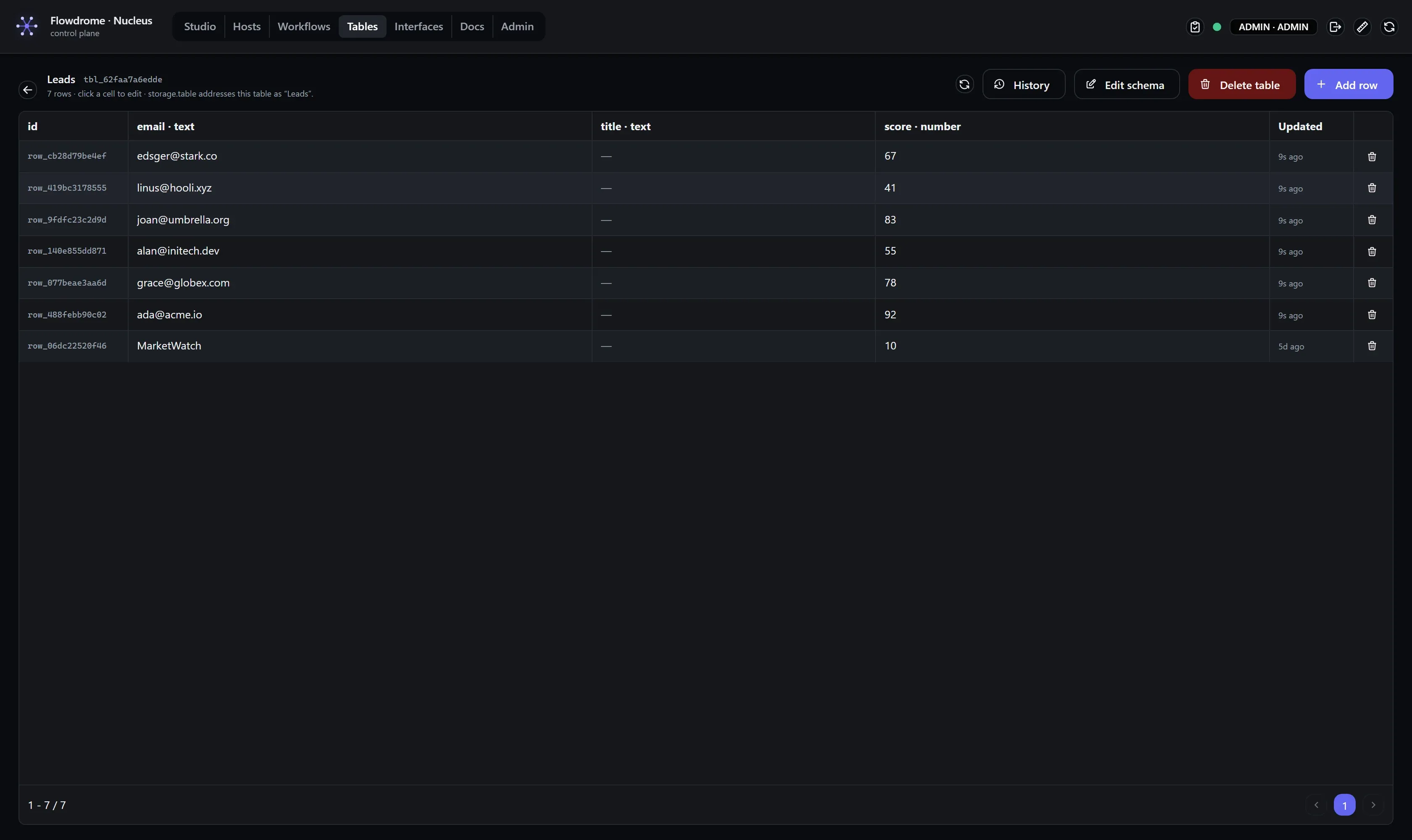
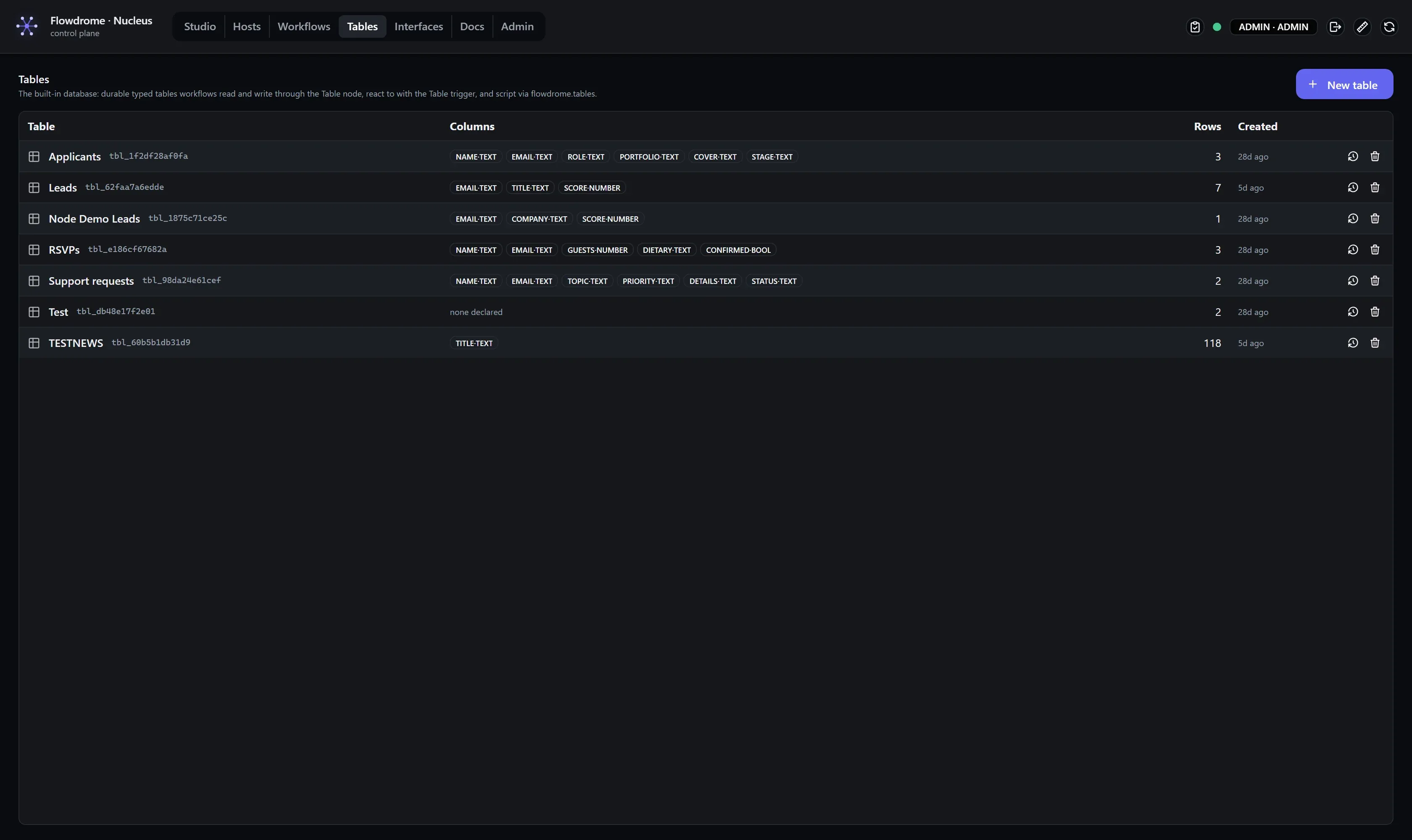
A table is a named grid with typed columns; every row automatically carries an id, a
createdAt and an updatedAt. Workflows address tables by name (“Leads”), so the same
workflow doc works on any Nucleus that has a table with that name.
| Column type | Holds | Notes |
|---|---|---|
text | strings | non-string values are stored as their JSON text |
number | numbers | numeric strings coerce ("42" → 42); sorts numerically |
bool | true / false | "true" / "false" strings coerce; renders as a checkbox |
json | anything JSON | objects, arrays — stored as-is |
datetime | ISO 8601 strings | validated on write (2026-08-01T09:00:00Z) |
Writes are forgiving on purpose: values are filtered to the declared columns (posting a whole webhook payload just keeps the columns you declared) and coerced to each column’s type — a value that cannot become the type fails loudly with a clear message. Forgiving is not the same as silent: the Table node reports what it dropped (see when a write says less than it looks).
The Tables screen
Nucleus → Tables lists every table (columns, row count, created). From there:
- New table — name it and declare the columns (name + type).
- Open a table — a paginated grid of its rows. Click a cell to edit it (Enter commits, Esc cancels; bool columns are checkboxes). Add row and per-row delete are right there.
- Delete table — removes the table and its rows after a styled confirm.
Reads need the viewer role; row writes need the executor role (the same gate deployed workflows use), and schema changes need the editor role.
Version history
A table’s schema is versioned exactly like a workflow. Every schema change — rename the table, add a column, drop one, retype one — mints a new version; editing rows is data and mints nothing. The history drawer carries the same teeth:
- Labels — name a version inline (“v1 columns”, “added
score”). - Pins — a pinned version is exempt from pruning.
- Compare — pick any two versions and get a column-aware diff: which columns were added,
removed, or retyped (
score: text → number), and whether the table was renamed. Retypes and drops are flagged as breaking — the changes an active deployment would notice. - Restore — re-applies an old schema as a new version, so a restore never destroys history.
GET   /api/tables/{id}/versions            [{version,savedAt,savedBy,label,pinned}] (newest first)
GET   /api/tables/{id}/versions/{v}        the schema at v: {name,columns:[{name,type}]}
PATCH /api/tables/{id}/versions/{v}        annotate {label?,pinned?}
POST  /api/tables/{id}/versions/{v}/restore  re-apply v as a new version
Where used
Usage answers “who depends on this table” before you change it:
- Workflows that reference the table (by name or id, via the Table node or trigger).
- Deployments currently serving it, each with the host, the workflow, the frozen schema
version they were deployed with, and a
staleflag when the live table has moved past it.
That list is the impact analysis you see when you edit a schema: a retype or a dropped column warns you which live deployments are still serving an older, pinned copy (see deploy carries a frozen copy) — they keep working on their pinned version until you redeploy.
GET /api/tables/{id}/usage {tableId,name,version,workflows:[…],deployments:[{hostId,workflowId,version,deployedAt,stale}]}The Table node (storage.table)
One node covers the data path. Pick the table (by name or tbl_ id) and an operation:
| Operation | Does | Output |
|---|---|---|
list | query rows — filters, paging, ordering | { rows, count, total, limit, offset } |
get | one row by id | { found, row } — a missing row is data, not an error |
insert | add a row | the row as stored: every column, plus id, createdAt, updatedAt |
update | merge values into a row (PATCH) | the updated row — a row that isn’t there is TABLE_ROW_NOT_FOUND |
upsert | update the row matched on a column, else insert | { row, created } |
delete | remove a row by id | { deleted, rowId } — already-gone rows answer deleted: false |
| any row operation, list input | the same operation, once per record | an array of the results above, one per record, plus meta { records, in } |
| any row operation, empty list input | nothing at all — no call, no row | [] |
list is the odd one out: it queries the table and ignores the input. The other five are row
operations, and row operations are array-native.
A list on the wire is N rows
Feed the node ten items and you get ten rows, each coming back with its own generated id and its
columns — not one row with the other nine records dropped. One object in gives one result out,
un-wrapped, so a batch and a single item read the same way, and switching Run once per item
on produces the same rows. An empty list writes nothing and returns [], which keeps “no data”
from looking like “one blank record”. That is the platform-wide record contract, not a Tables
special case — see
Processing 1,000 items.
What makes one mapping write N correct rows is where the {{ }} are resolved. Values and
Row id are on the expression pass’s self-evaluating list, so the boundary leaves their braces
alone and the node resolves them per record: inside them $json is this record and
$itemIndex is its position in the batch. Split three stories out of an HTTP response, map
title → {{ $json.title }} once, and three rows land with three different titles — resolving that
mapping once against the whole array is what used to write a single row of empty columns.
Where the values for insert/update/upsert come from, in order:
- Values path — a dot-path to an object on this record. A path landing on nothing, on a
list or on a scalar is a
TABLE_CONFIG_INVALIDthat names what actually arrived. - Values — the configured column → value mapping, resolved against this record.
- Neither configured — the record itself is the row: the whole input object when a single
object arrived, each element when a list did. A record that is itself a list is a coded config
error, not a guess (
TABLE_CONFIG_INVALID— this record is itself a list; configure Values, or split the data so each item is one row).
- Upsert is the workhorse: set Match column (e.g.
email) and re-running the workflow updates the existing row instead of duplicating it — dedupe for free. It looks the row up and then PATCHes it; if that row is deleted in between, the node failsTABLE_ROW_NOT_FOUNDrather than answering{ row: null, created: false }— a successful-looking upsert that wrote nothing. - Filters (list): each row is
column · equals|contains · value;containsis a case-insensitive substring match. Order by any column (numbercolumns sort numerically) or the built-increatedAt/updatedAt. - Row ids for
get/update/deletecome from the Row id field (an expression, resolved against each record) or from Row id path on the record (defaultid— a row from an earlier Table step carries it there). - Records are written in order, and a record that fails stops the node there — config failures say which one (“record 3”). The rows written before it stay written.
When a write says less than it looks
Two ways a write succeeds and still disappoints. Both are reported on meta.warnings — amber on
the node in the editor, listed in the run detail — while the run itself still succeeds and the
stored data is unchanged:
- A configured value resolved to nothing:
no value resolved for "email" — that column was written empty (check the expression against the data actually arriving here). Only values you configured are judged this way; a null arriving in the input data is data, not a mistake. - Keys that aren’t columns were dropped. The node diffs what it sent against the row that came
back:
"emial", "extra" are not columns of "Leads" and were not written— and, when nothing matched at all,NOTHING was written — … so the row is empty.
In the editor and on the Nucleus’s built-in host the node reaches the Tables API automatically
(the engine arms it the same way the platform SDK is armed). On a standalone host, either export
FLOWDROME_WORKER_SDK_URL / FLOWDROME_WORKER_SDK_TOKEN or set the node’s Nucleus URL /
Nucleus token overrides.
The Table trigger (input.table)
input.table starts a run when a row is created, updated or deleted in the watched table
(pick the kinds, or react to all). Each change becomes one run seeded with:
{
  "table": "Leads",
  "tableId": "tbl_1a2b3c",
  "rowId": "row_9f8e7d",
  "event": "created",
  "at": "2026-07-19T12:00:00Z",
  "row": { "id": "row_9f8e7d", "email": "ada@example.test", "score": 42 }
}
row is the current row for created/updated and null for deleted. Deployed to a host, the
trigger polls the table’s change feed (Poll every, default 5s) and is baselined at deploy:
it reacts to what happens next, never to history. In the editor it behaves like every serve-style
trigger — seed it with a sample change and Test.
From code and from the API
Inside any code node the platform SDK exposes the same surface:
await flowdrome.tables.ensure("Leads", [
  { name: "email", type: "text" },
  { name: "score", type: "number" }
]);                                                       // idempotent create
await flowdrome.tables.insert("Leads", { email: "ada@example.test", score: 42 });
const page = await flowdrome.tables.rows("Leads", {
  filters: [{ column: "email", op: "contains", value: "@example.test" }],
  orderBy: "score", order: "desc", limit: 10
});
The REST surface underneath (Bearer token, same roles as the screen):
GET    /api/tables                        list
POST   /api/tables                        create { name, columns: [{ name, type }] }
GET    /api/tables/{idOrName}             one table
PUT    /api/tables/{idOrName}             rename / replace columns
DELETE /api/tables/{idOrName}             drop table + rows
GET    /api/tables/{idOrName}/rows        ?limit&offset&orderBy&order&filter=[{"column","op","value"}]
POST   /api/tables/{idOrName}/rows        insert { values }
GET    /api/tables/{idOrName}/rows/{rowId}
PATCH  /api/tables/{idOrName}/rows/{rowId}  merge { values }
DELETE /api/tables/{idOrName}/rows/{rowId}
GET    /api/tables/{idOrName}/changes     ?since=<seq>&includeRows=1 — the trigger's poll feed
Everything is parameterized server-side — filter values are data, never SQL.
Try it
The seeded Node Demos folder carries the pair: Lead ledger — Flowdrome Tables (ensure + upsert + list — watch the grid fill on the Tables screen) and New lead lands — Table trigger (react to the writes). v1 keeps the surface deliberately small; linked records and button columns (run a workflow from a row) are planned as v1.1.