Workflows & nodes
A workflow is a directed graph of nodes connected by edges between typed ports. You build it on the Studio canvas; the engine executes the same graph — in the editor’s test runs and, deployed, on every host.
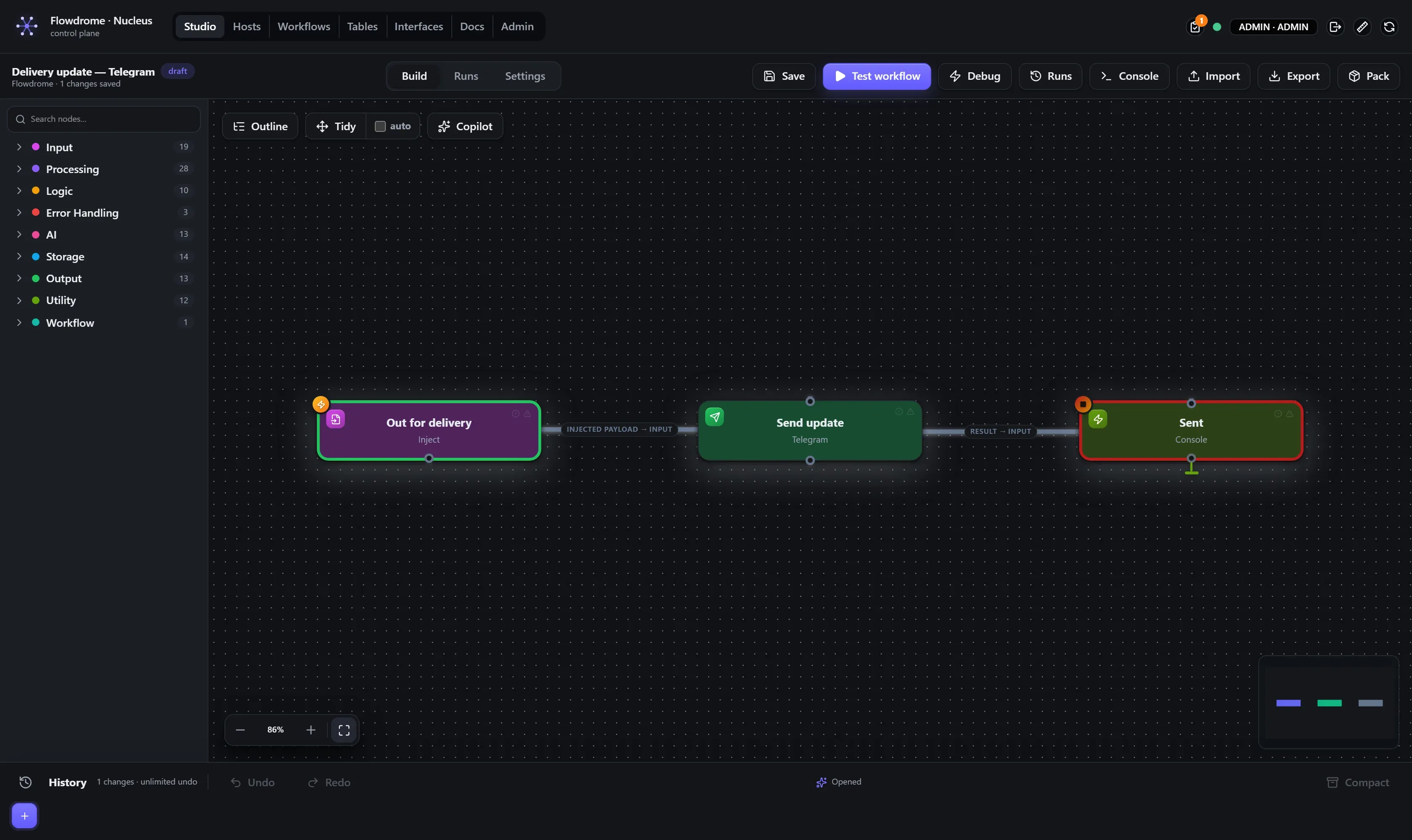
One format, everywhere
There is exactly one workflow document format — flowdrome.workflow.v1 — used by the Studio
editor, export/import, the Nucleus registry, and every host’s embedded engine. The graph you
draw is the document; nodes carry their id, type, label, position and configuration (plus
◈ carrier attachments like a wired AI Model), edges carry source/target node and port. What you export is what deploys — there are no converters
between an “editor format” and a “runtime format”, so there is no class of bug where the two
drift apart. (The editor’s canvas library has its own in-memory representation, but it is
adapted on the fly and never persisted.)
This has practical consequences:
- An exported file is a complete, runnable artifact — share it, diff it in git, re-import it anywhere.
- The node reference can be generated from the same registry the engine uses, so the docs cannot drift from the code.
- A workflow built by hand (or by a script) deploys exactly like one built on the canvas.
Nodes and ports
Every node declares its input and output ports. Most have one of each; flow-control nodes have
more — If has True/False outputs, Switch grows one output per rule, Merge takes
Input 1 … Input N, Try exposes SUCCESS/ERROR/FINALLY. Ports are visible on the
canvas and the engine routes data per port — a branch is a wire you can see, not a
convention buried in config.
Some port sets are dynamic, derived from config: add a rule to a Switch and a new output handle appears; set Merge’s “Number of inputs” to 4 and four pins render. The reference pages note every such rule.
Port labels always render in full — a node with long port names (an HTTP Trigger with a
route table, a parallel Execute Workflow) widens to fit its longest label instead of truncating. The
label’s typography tells you its state at a glance: bold means something is wired to that
port, italic means the port is optional (the node works without it — ◈ Memory, Feedback,
Try’s Finally), and an optional port that’s wired is both.
For multi-input nodes the engine orders inputs deterministically by target port — Input 1 is always Input 1 — which is what makes choices like Merge’s “prefer Input 2 on clash” stable and meaningful.
Properties: one model, rich where it counts
Node configuration is a flat list of typed properties — string, number, boolean, select, multiselect, JSON, code, cron, rows, credential — rendered by one generic property editor, which the Studio draws on the node itself. That uniformity is deliberate: every node feels the same, and adding a node to the catalog automatically gives it a complete editing UI, validation, and a generated reference page.
Where a richer editor earns its place, it’s there: a cron builder with live next-fire preview,
CodeMirror for JavaScript, a structured rules editor for Switch, and the visual JSON editor
everywhere JSON is edited or displayed. Properties can also declare visibility rules
(“shown when mode === "cron"”) so a node only shows the settings that currently apply.
Expressions: {{ }} wherever you can enter a value
If you can enter a value, it can hold an expression — paths, math, variable references,
anything. That covers plain string fields, field-path boxes (an IF rule’s Field path,
Body path, Value path, Field to split out …), and a rule’s compare value. A {{ }}
is real JavaScript evaluated per item, in every node, identically in the editor and on
deployed hosts (with one deliberate exception, below):
Order {{ $json.orderId }} for {{ $json.customer }} — {{ $json.items.length }} itemsDetails that matter in practice:
$jsonis the incoming item. Mixed text interpolates; a field that is only an expression yields the raw value (numbers stay numbers).- The whole envelope is addressable. An accessor that misses on the content falls back to
the wire envelope itself, so
{{ $json.createdAt }},{{ $json.trace.runId }},{{ $json.meta.result[0].status }}(the result ledger) and full{{ $json.body.payload.x }}paths all resolve — picked from the field browser or typed. Content always shadows the envelope. Plain dotted paths in field-path boxes reach the same fields. - In a field-path box, a pure
{{ }}entry is the computed value; an interpolated entry likeitems.{{ $json.idx }}composes a path and resolves it. A non-compiling expression fails the node by name (EXPR_CONFIG_INVALID) — never a silent null. - Expressions descend into JSON-in-a-string: when
bodyis a JSON string (a typical HTTP response),{{ $json.body.results[0].name }}parses it on the way in instead of forcing a script node. - The run-data viewer’s right-click → Copy Flowdrome path writes the correct expression for any field you can see — the fastest way to get paths right.
- Fields with their own semantics (code editors, JSON editors, credential/secret fields) are excluded on purpose.
- The exception — self-evaluating keys. A short list of keys is deliberately skipped by the
boundary pass because the node resolves them itself. That list is every record-writing node’s
mapping keys (
storage.table’svalues/rowId,storage.write-file’spath,storage.notion’sproperties,storage.redis’skey/value/field…), plus a few templates a node already owns (ai.prompt’sprompt,ai.agent’ssessionKey/message,output.http-request’sheaders/query), and the rule nodes’ own keys (logic.if/logic.filter-conditionpath/value/valuePath— the rule engine resolves them itself). The reason is arity: when a list arrives, the boundary binds$jsonto the whole array, so{{ $json.title }}in a row mapping resolves against the array and writes a blank column — the node has to resolve it against each record instead (see Processing 1,000 items). The table isEXPRESSION_SELF_EVALUATING_KEYSinpackages/runtime-core/src/node-properties.mjs, and both halves are mandatory: a key listed there that the node does not resolve reaches the wire as literal braces (in the per-item path too), and a key the node resolves without being listed is evaluated twice. ${credential.*}and${variable.*}placeholders resolve once at run start, before any expression runs — see Credentials & variables.
Validation before you run
Every node has a verify rule set, evaluated live in the editor: per-port connectivity (a trigger with no outgoing wire is an error), format checks (cron expressions, URLs, JSON fields), and content warnings (empty code). The badges sit bottom-right on each node — dim when clean, lit with a count when not — with hover details. The same checks gate nonsense early in CI-ish flows: a workflow that fails verification tells you where and why before any data moves.
Frames: Loop, Try and Thread Pool
Three constructs are frames — visual containers whose membership means something to the engine. You drag nodes into them; membership is containment, persisted in the document:
- Loop Over Items — members run per batch over an item list, with batch size and
concurrency settings; results collect on the frame’s
doneport. See the Loop reference for the captured frame. - Try — an error boundary. Members run normally; a member that throws is retried per the
frame’s policy and the failure routes to the frame’s
ERRORport with the exception — instead of failing the run.FINALLYruns either way. See Try and error handling. - Thread Pool — queue-fed concurrency: the frame consumes from an input queue, runs its body on an elastic worker pool, and feeds an output queue. The worker-pool pattern as a drawing.
A fourth frame — Snippet — is purely visual grouping for big graphs; the engine ignores it.
Processing 1,000 items
Four mechanisms, from most native to most explicit — most flows never need the last two:
- Whole-set (default). List-aware nodes (Sort, Dedupe, Aggregate, Split Out, Limit, CSV …) process the entire list in one execution. One node run, no per-item overhead.
- Record fan-out (default, on nodes that write records). A list arriving at a storage node
is N records, not one blob: the node runs its operation once per record and returns one
result per record — ten stories into
storage.tableare ten rows, each coming back with its generated id and its columns. A single object in gives a single result out, un-wrapped; an empty list writes nothing and returns[]. Because this is the native behaviour, switching Run once per item on produces the same rows — the toggle is no longer how you make a batch write correctly. The contract lives inpackages/runtime-core/src/nodes/per-record.ts. - Run once per item. A per-node toggle that maps the node over its input list. Branching nodes (If / Filter / Switch) then split the stream: a 100,000-item list through an If yields two real item streams, routed per port. Items that error can be dropped instead of failing the run (the per-item error policy).
- Loop Over Items frame — when a whole section of the graph must iterate, with explicit batching and concurrency.
Which nodes fan out, and which deliberately don’t
A node opts into the record contract by listing its mapping keys in
EXPRESSION_SELF_EVALUATING_KEYS and resolving them per record. Eleven storage nodes do:
storage.table, storage.s3, storage.redis, storage.global-key-value, storage.memory
(append only), storage.notion, storage.hubspot, storage.google-drive,
storage.google-docs, storage.write-file and storage.ftp — plus ai.vector-store, which
embeds one vector per record with that record’s own metadata. Where the protocol allows it, the N
operations still share one round of setup: Redis pipelines N commands over a single connection,
FTP logs in once for the batch, Google Docs sends one batchUpdate per target document.
Two nodes changed shape as a result:
storage.memorywithappendnow writes one entry per element, so ten turns leave ten entries andmaxItemscounts what you’d expect. To store a whole list as one entry, wrap it first —{ items: [...] }out of Set or Aggregate is a single record.set,clear,getandrecallare whole-value operations on one key and stay single whatever arrives.storage.write-filefans out only when the file path actually varies per record (a{{ }}template, or a path read off each record); a literal path is still one write of the whole batch. When two records resolve to the same path and Append is off, the node fails withIO_WRITE_PATH_COLLISIONbefore writing a byte — overwriting would have kept only the last record and destroyed the rest silently.
Three record-ish nodes are left alone on purpose, not by oversight. storage.sql keeps query
and params expression-excluded: making them eligible would reintroduce the string splicing
that server-side positional parameters ($1…$n / ?) exist to prevent, and real batching there
means a multi-row INSERT. storage.mongo’s insertMany already sends the whole array as one
bulk command. storage.google-sheets already posts the batch as one values grid, whose column
order is derived once from the first row — per-record calls would cost N round-trips and lose
that shared alignment. The messaging senders (Slack, Telegram, Discord, WhatsApp, Gmail, Outlook,
Send Email) are also out of scope: they are rate-limited per channel, so one message with N lines
is usually the right default rather than a bug.
Sub-workflows
The Execute Workflow node runs other stored workflows — sequentially, or in true parallel
with one labelled output per child (w0, w1, …). Compose libraries of small flows and
orchestrate them; the debugger can step into a sub-workflow run and
surface back to the parent. Workflows-as-building-blocks is also how the
AI Agent treats your flows: any stored workflow can be exposed to an agent
as a callable tool.