SSO & audit log
Flowdrome’s identity is self-hosted and durable: users, roles and sessions live in the Nucleus’s own database. The enterprise identity pack adds the two things every security review asks for first — single sign-on through your identity provider, and an append-only audit log you can filter, query over the API and export.
Single sign-on (OIDC)
One generic OpenID Connect configuration covers every mainstream provider — Okta, Microsoft
Entra ID, Google, Keycloak, Auth0, or anything that serves
{issuer}/.well-known/openid-configuration. The flow is Authorization Code + PKCE; the
Nucleus discovers the provider’s endpoints from the issuer URL, validates the returned
id_token (RS256 signature against the provider’s JWKS, plus issuer / audience / expiry /
nonce checks) and signs the user in with the same session token a password login mints —
one session system, two front doors.
Configure it
Admin → Users & Roles → Single sign-on (Manage capability):
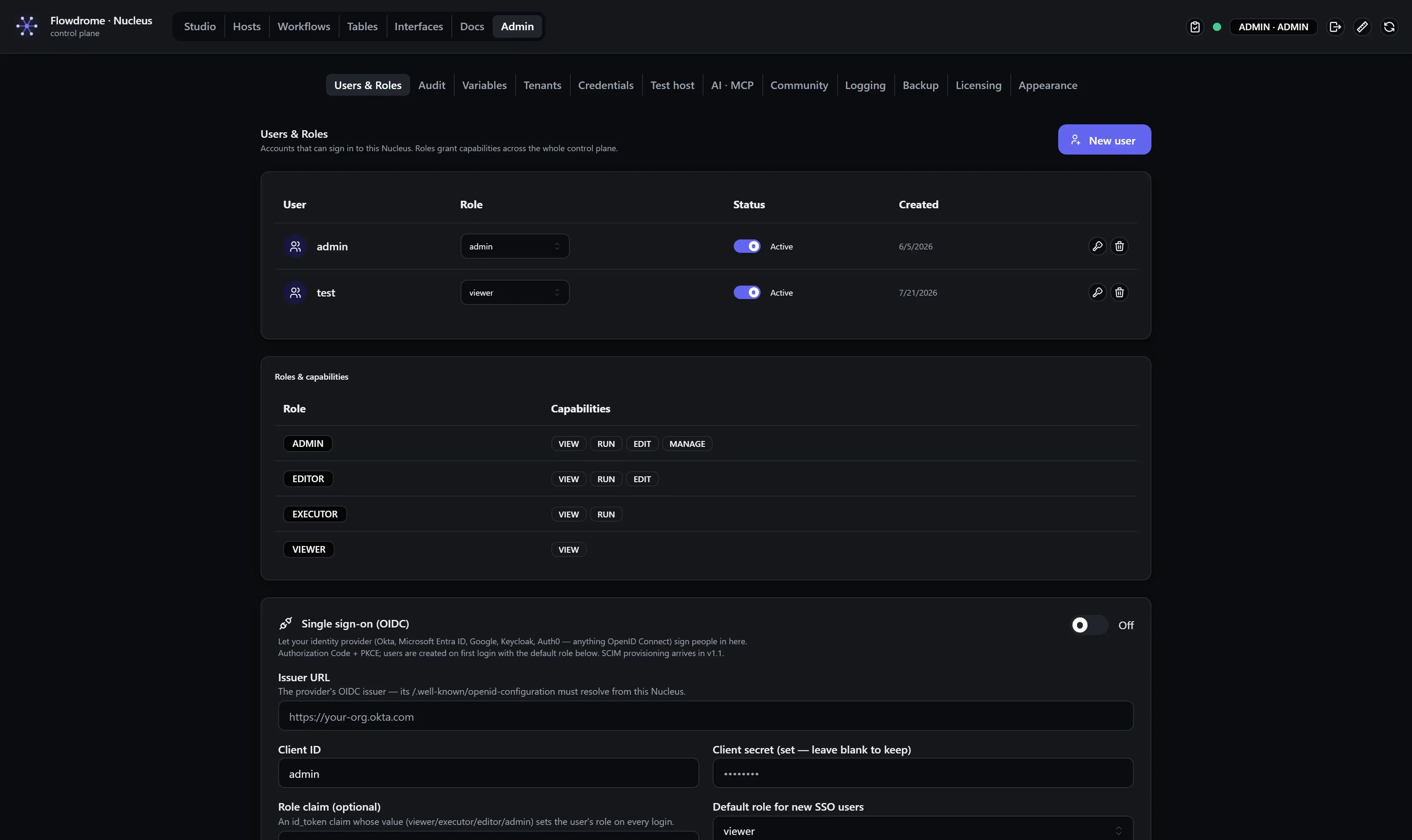
| Field | Meaning |
|---|---|
| Issuer URL | The provider’s OIDC issuer, e.g. https://your-org.okta.com, https://login.microsoftonline.com/{tenant}/v2.0, https://accounts.google.com. Its /.well-known/openid-configuration must be reachable from the Nucleus. |
| Client ID / secret | From your IdP app registration. The secret is write-only: the UI only ever shows whether one is set, and it is stored encrypted (AES-256-GCM, the same data key that protects the credentials vault). Leave the field blank on save to keep the stored value. |
| Role claim (optional) | An id_token claim whose value (viewer / executor / editor / admin) sets the user’s Flowdrome role on every login — the IdP becomes authoritative for roles. Leave empty to manage roles locally. |
| Default role | The role a first-time SSO user is created with (default viewer). |
In your IdP, register a web application with the redirect URI:
https://<your-nucleus>/api/auth/oidc/callback(The settings panel shows the exact value for your origin. Behind a reverse proxy, set
FLOWDROME_OAUTH_PUBLIC_URL so the redirect URI carries the public origin.)
Provider notes:
- Okta — create an OIDC Web App; issuer is your Okta domain (or a custom auth server’s issuer).
- Microsoft Entra ID — App registration → Web platform; issuer is
https://login.microsoftonline.com/<tenant-id>/v2.0. - Google — OAuth client (Web) in Cloud Console; issuer is
https://accounts.google.com.
Signing in
Once enabled, the login dialog gains a Sign in with SSO button. Users are matched by
their email claim (falling back to preferred_username, then sub); an unknown user is
created on the spot with the default role, a disabled account is refused even with a valid
IdP login, and SSO-provisioned accounts get an unusable random password — the IdP is their
only door. Password sign-in for locally-created accounts keeps working alongside.
Audit log
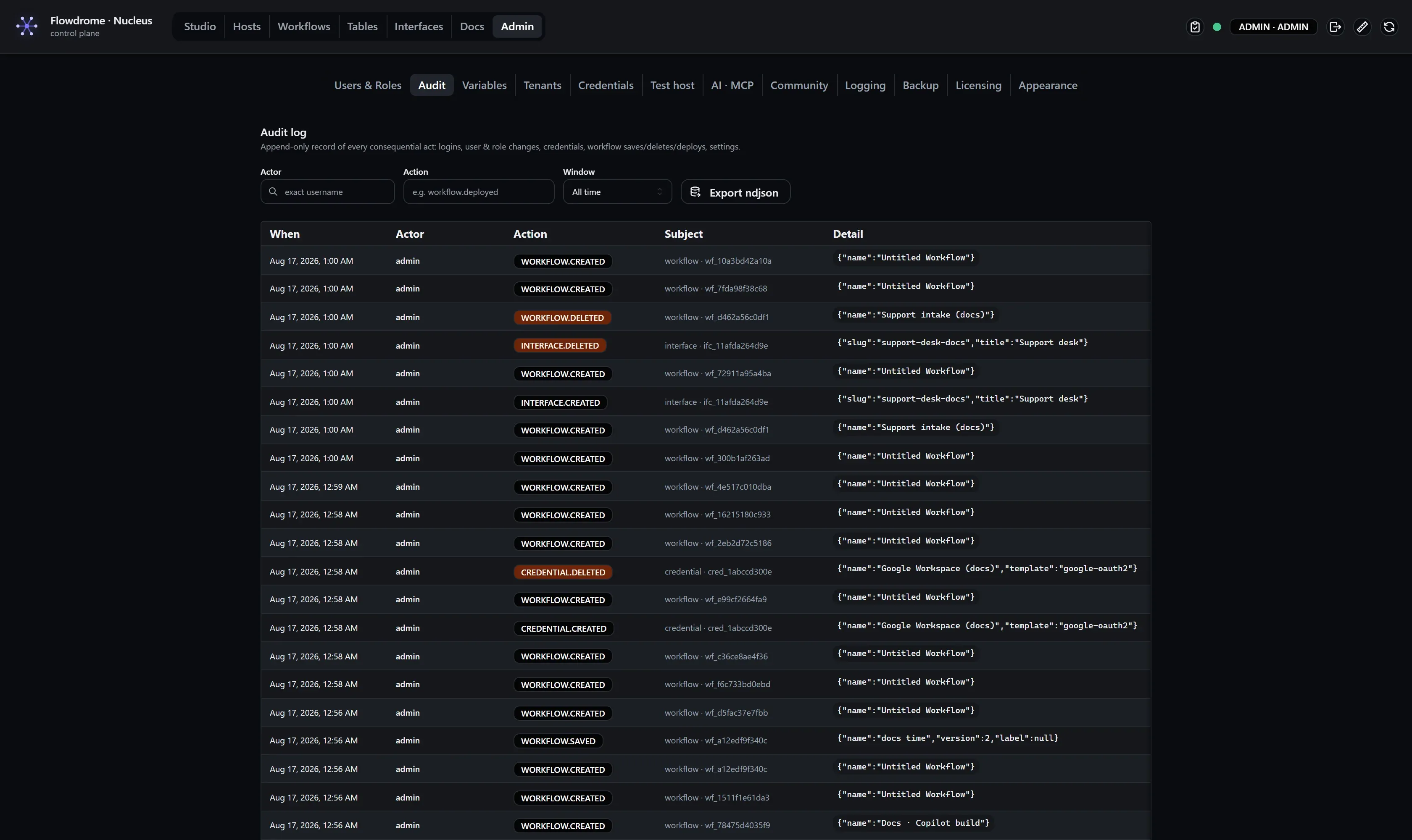
Every consequential act on the control plane lands one row in an append-only audit table in the Nucleus’s database — there is no update or delete path, the log only grows:
- logins — password and SSO, success and failure (with the failure reason)
- users & roles — create, role change, enable/disable, password reset, delete
- credentials — create, update, delete — names and templates only, never secret values
- workflows — create, explicit (checkpoint) saves with their version, lock/unlock, delete, deploy/undeploy with the target host
- variables and settings — variable changes, SSO / MCP / telemetry settings changes
- backup — export (the file carries the decrypted vault — headline event) and restore
- audit export itself — handing the whole trail to one person is audit-worthy too
Each entry records who (actor), what (a dotted action like workflow.deployed),
the subject (type + id), a small JSON detail object, the source IP and the
timestamp. In-session editing is deliberately not audited — only explicit saves that mint a
version — so the trail stays signal, not noise.
Reading and exporting it
Admin → Audit is a dense, filterable table (actor, action, time window) with server-side paging. The same surface is API-queryable (Manage capability):
# newest first; filters are exact-match, since is unix-ms or ISO-8601
curl -H "Authorization: Bearer $TOKEN" \
  "https://<nucleus>/api/audit?limit=100&actor=jane@corp.test&action=workflow.deployed&since=2026-07-01T00:00:00Z"

# the whole log (oldest first) as newline-delimited JSON — constant memory however large
curl -H "Authorization: Bearer $TOKEN" "https://<nucleus>/api/audit/export" -o audit.ndjson
The Export ndjson button in the Audit tab does the same download, honoring the active
filters — ready for your SIEM’s file/S3 ingestion or a quick jq session.