Build a form that files requests
In about ten minutes you’ll build the classic business form end to end: a support-request portal where visitors submit a request, a workflow validates and files it into a table, and your team works a live queue. Every piece is something you can inspect afterwards — the same pattern powers job applications, RSVPs, order intake, feedback, anything.
The flow of data, so nothing below is mysterious: the visitor’s form fields → the Nucleus →
your workflow’s input ({{ $json.email }} etc.) → a Table row. The page never holds a
credential; every hop is server-side.
Step 1 — Create the table
Requests need somewhere to live. In the Nucleus header open Tables → New table:
- Name:
Support requests - Columns:
name(text),email(text),topic(text),priority(text),details(text),status(text)
That’s the whole schema. Rows automatically carry an id, createdAt and updatedAt; writes
are filtered to these declared columns, so posting a whole form at the table just keeps what
you declared. (More on Tables →)
Step 2 — Build the intake workflow
Open Studio → new workflow, name it File support request, and wire five nodes:
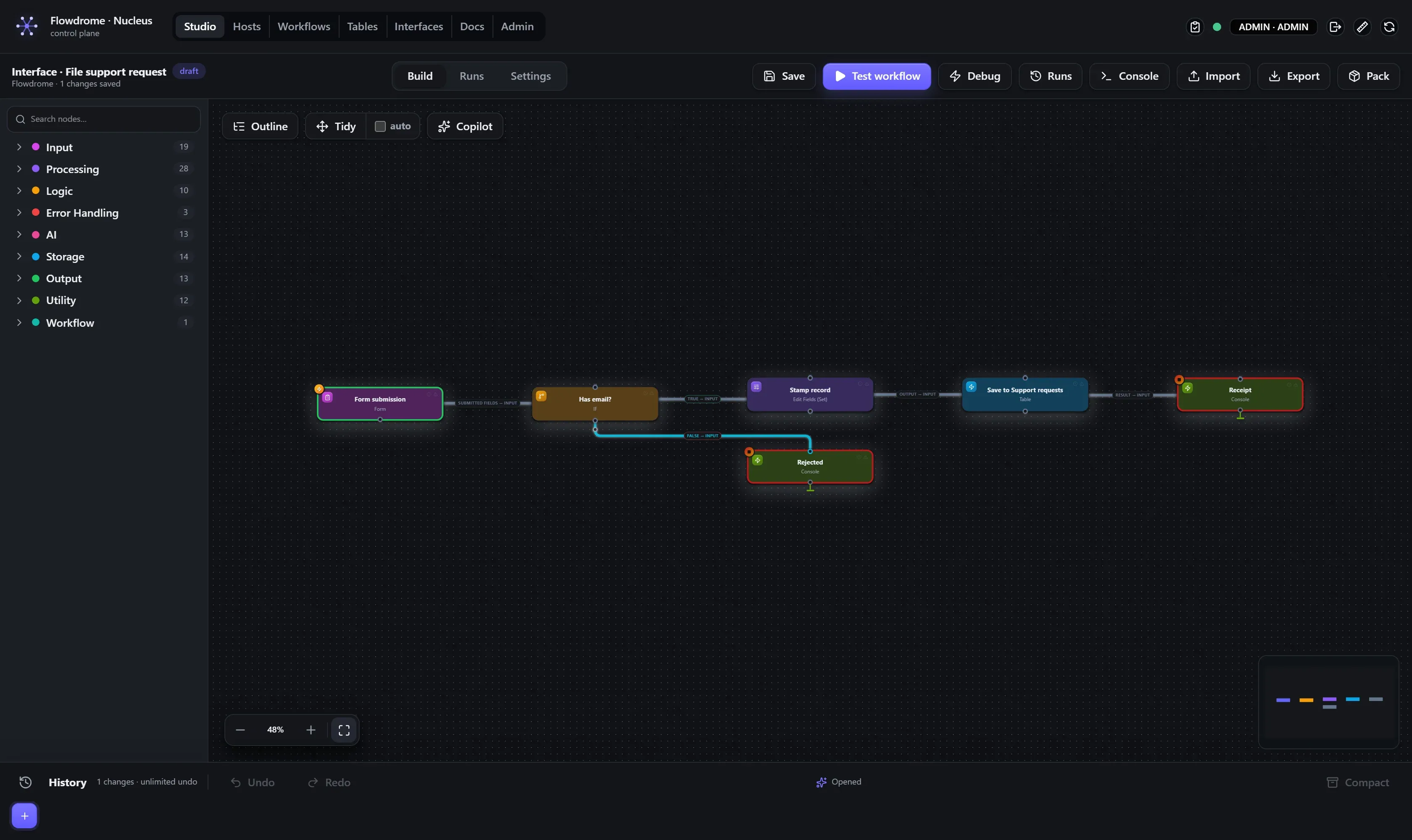
- Form trigger — the front door. The interface’s form fields arrive as this workflow’s
input, so downstream nodes read them as
{{ $json.email }},{{ $json.topic }}, and so on. - If — gate on the one field you can’t live without: Path
email, Operatorexists. Belt-and-braces server-side validation behind the form’s ownrequiredflags. - Edit Fields (Set) on the true branch — add
status=new, keeping everything else (Include: all). Every fresh request starts life asnew. - Table — Table
Support requests, Operationinsert, and leave Values empty: an empty Values means “insert the whole input”, which is exactly the submitted form (filtered to your declared columns — the file attachment simply doesn’t land in the table). - Console — a receipt you’ll see in the run:
Support request filed by {{ $json.email }} — {{ $json.topic }}. Add a second Console on the If’s false branch so rejected submissions are visible too.
Save (Ctrl+S). Test it right here if you like: the Form trigger passes any test input
through, so Test workflow with {"name":"Ada","email":"ada@acme.io","topic":"Billing", "details":"trial"} should end green with a new table row.
Step 3 — Compose the page
Open Interfaces → New interface — title Acme Support, slug support-desk. You land in
the builder: structure on the left, a live preview on the right that re-renders as you type.
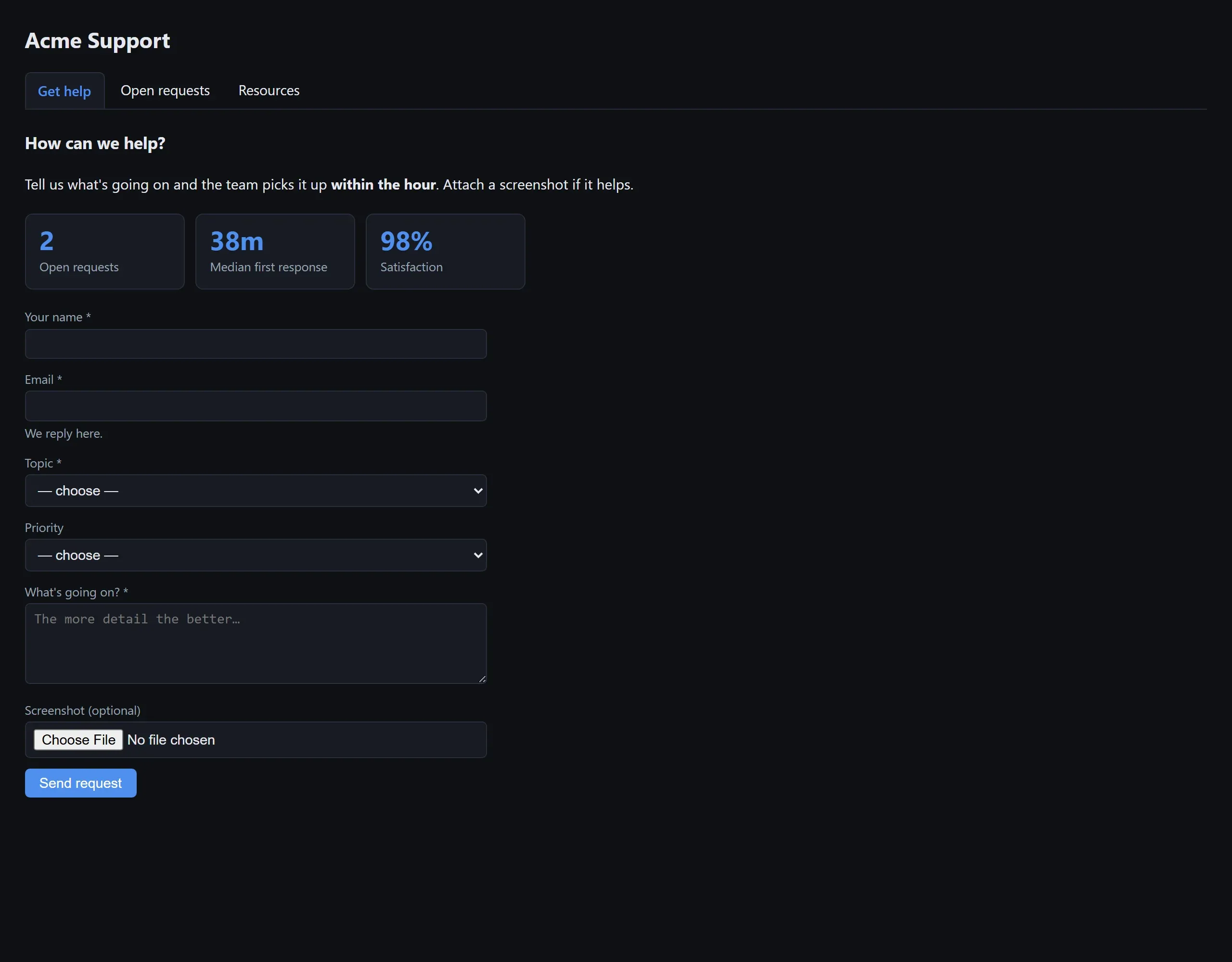
On the first page (rename it Get help), add blocks:
- heading —
How can we help? - markdown — a sentence of reassurance.
**bold**and[links](https://…)work. - stat — three tiles:
Open requestspointed at your Support requests table (a live row count), and fixed values like38m/98%. - form — the heart of it:
-
Workflow:
File support request -
Fields — each field’s name is the key the workflow reads, so they must match what Step 2 expects:
name label type required nameYour name text ✓ emailEmail email ✓ topicTopic select ( Billing, Bug report, How do I…)✓ priorityPriority select ( Normal, High, Production down)detailsWhat’s going on? textarea ✓ attachmentScreenshot (optional) file -
Response text:
Got it — we're on it.(Or set a Redirect URL to send the visitor to a thank-you page instead.)
-
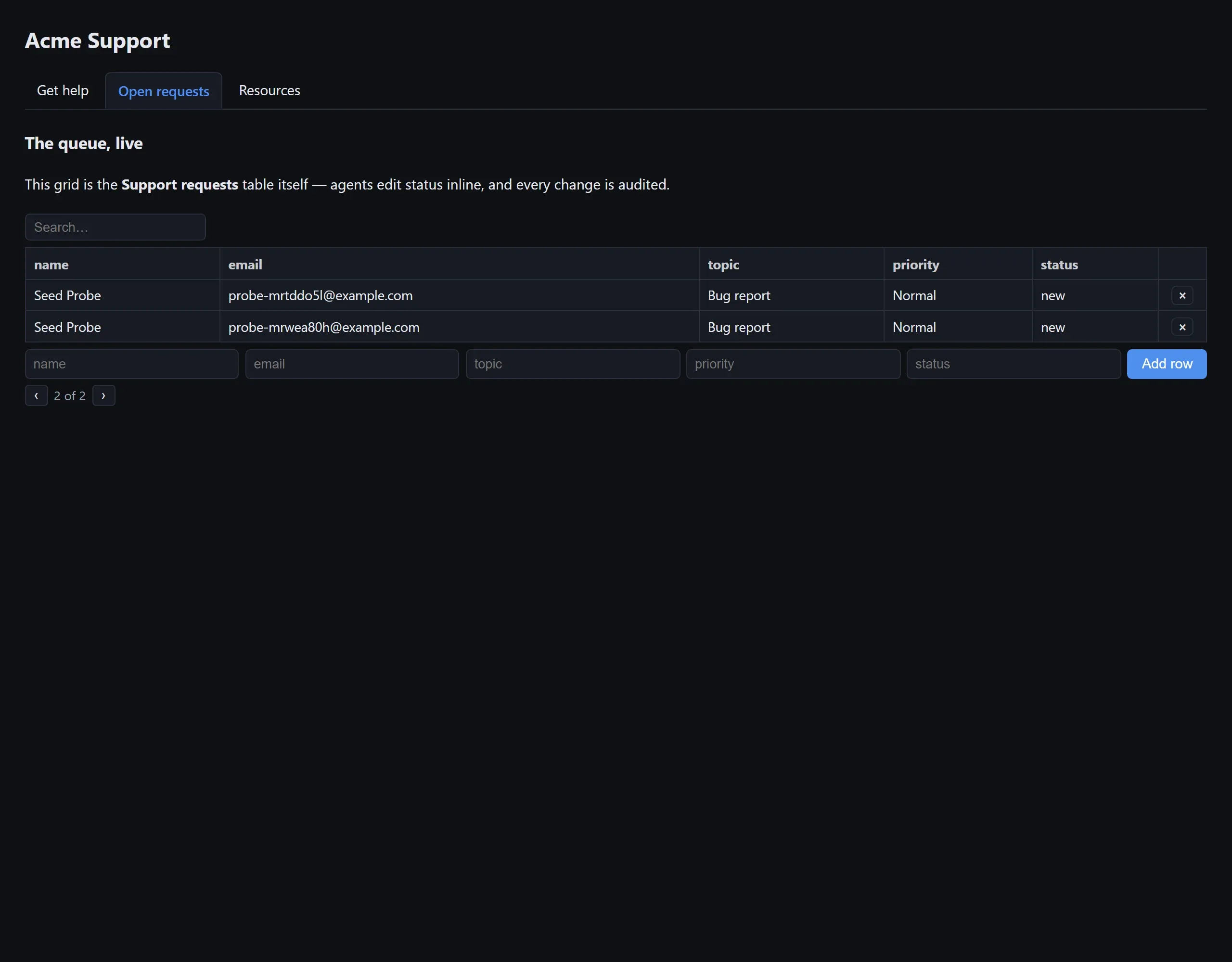
Watch the preview build itself as you go. Then add a second page with + — call it
Open requests — and give it a table block: your table, mode editable,
search on. That page is your team’s queue: search, edit status inline, delete.
Pick an accent color and light/dark at the top, and Save.
Step 4 — Publish and prove it
Hit Open page, fill in your own form, submit. Then prove the whole chain, end to end:
- Runs (Studio → Runs) shows a run with actor
interface:support-desk— open it and read your Console receipt and every node’s envelope. - Tables → Support requests — your submission is a row,
status=new. - The portal’s Open requests page shows it live; edit its
statusinline right there.
Step 5 — Control who gets in
In the builder header, Access:
- Public — anyone with the URL (right for a support form).
- Link with key — the URL only works with its
?k=…key; Rotate key invalidates every shared link instantly (right for the internal queue — or split the queue into its own key-gated interface). - Password — visitors get an on-brand password page; correct entry mints a session cookie.
Every run and every visitor table-edit lands in the audit log.
Where to go next
- The two other seeded demos show the same pattern shaped differently: /if/careers (job applications feeding a hiring-pipeline page) and /if/event-rsvp (an upsert form — re-submitting the same email updates the RSVP instead of duplicating — behind a link key, with an organizer page whose button fires a broadcast workflow).
- Interfaces reference — every block kind and access mode.
- React to new rows elsewhere with the Table trigger, or notify Slack from the intake workflow — it’s a normal workflow; extend it like one.
Troubleshooting
| Symptom | Cause |
|---|---|
| Form submits, table stays empty | The workflow starts with an Inject trigger (static payload swallows the submission) — use Form; or field names don’t match what the workflow/table expect |
| ”not found” on submit | The form block’s workflow was deleted or never picked |
| Visitors can’t edit the queue | The table block’s mode is readonly — flip it to editable |
| The stat tile shows — | Its table reference is unset — pick the table, not a fixed value |